Smarter SharePoint:
AI Search & Multilingual Sites
Localization, translation and search: simplified, optimized and scalable
Start Free Trial
SharePoint Admin account needed to install


Localization, translation and search: simplified, optimized and scalable


Helping companies, governments, and NGOs efficiently manage multilingual SharePoint sites with innovative solutions and exceptional support, including SharePoint language translation, multilingual support and more!


Simplify the management of multilingual sites with tools to translate the user interface, hard coded items and site content.

.png)
Translate SharePoint pages and documents instantly with high-quality neural AI. Customize UI, glossaries, and style, without the cost or wait of manual translation.

Isn’t SharePoint already multilingual? Why do I need PointFire?
While SharePoint does offer some multilingual features, PointFire integrates with your current sites
to ensure that you localize and translate everything.
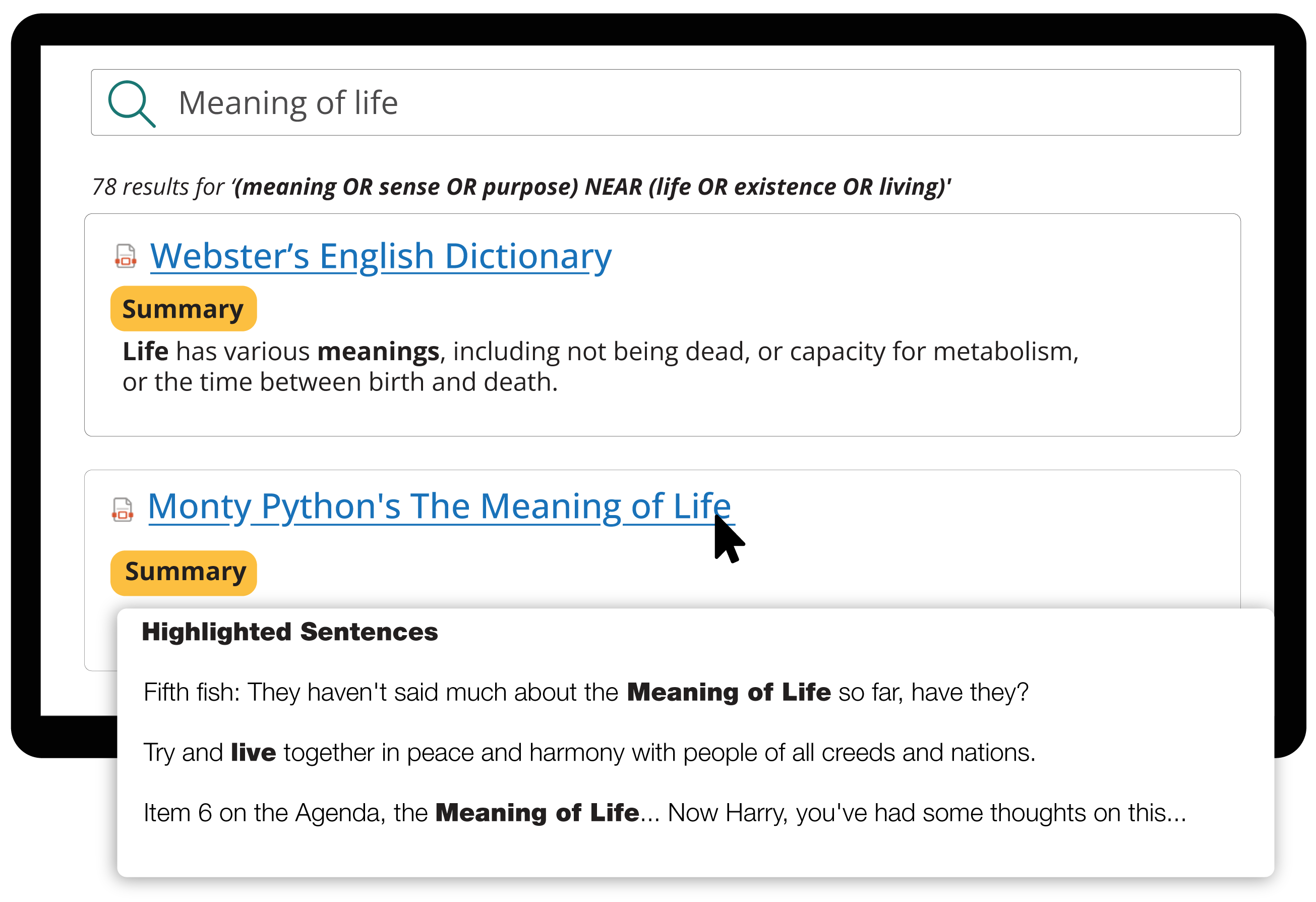
Turn unhelpful snippets into relevance-based summaries. Save time and find answers faster with the PointFire Search Summarizer.

Translate everything that multilingual SharePoint can’t
Almost instant language change
User friendly language toggle
Translate hard coded items like choice columns
Over 50 SharePoint languages + 70 other languages
Human-parity translation of content
Classic and modern pages
PDFs, Word, Excel, PowerPoint
Know what is relevant in each search result
Highlighted sentences show you where your query is mentioned in each document
Extension for PnP Modern Search
The PointFire products integrate seamlessly with SharePoint and with each other.
Find your right fit. Talk to our experts.
Here’s why our clients use the PointFire products


PointFire provides innovative solutions for SharePoint language translation— thereby allowing organizations to easily translate SharePoint multi-language sites and documents. This includes Word, Excel, PowerPoint files, and PDFs. This SharePoint translation management tool helps streamline multilingual support, making it easier for global teams to manage content in multiple languages.
PointFire enhances SharePoint multilingual capabilities— which is done through providing tools for automatic translation of content and the user interface (UI). It also supports SharePoint language translation for classic, modern, and team pages in both SharePoint Online and on-premises versions. With this, users can toggle languages quickly and see translated pages in real-time. Furthermore, PointFire integrates seamlessly with SharePoint search tools, improving content visibility across languages.
Great Question! It’s not a matter of choosing one over the other, but of adding PointFire functionality to enhance the built-in features. While SharePoint offers some multilingual features, PointFire provides a comprehensive solution for SharePoint multilingual support— It offers seamless translation for any content, UI, and documents. This allows for faster and more accurate SharePoint language translation with machine learning options. It is important to note that PointFire also integrates with SharePoint search results and enables easy switching between languages with the language toggle feature.
PointFire uses neural human-parity machine translation, which helps to ensure high-quality translations with minimal errors. You can override its translations with your own glossary list. It also supports Azure AI Custom Translator, where the system learns your organization's specific terminology, allowing for personalized and accurate translations for SharePoint multilingual sites. Also, users can also review and edit translations before they are published - This ensures accurate content in all languages!
PointFire offers unlimited support with every plan! If you need help with SharePoint language translation or SharePoint multilingual support, be sure to contact us through our Support page or reach out via our contact details.